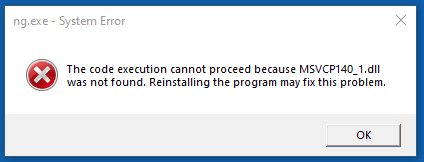
This is an error that appears immediately when you run NeuroGuide and will not let you proceed.
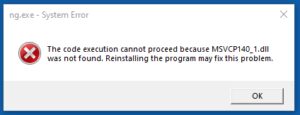
Here is the reason we are getting this error and the solution:
This is generated when NeuroGuide cannot find the Microsoft C++ Runtime DLL it needs to run. Normally all compilers include this .DLL as part of the build. However, the new policy issued by Microsoft is to EXCLUDE this .dll from the compile, since they will be including it in all computers themselves and when developers include this file themselves, it causes security issues. In keeping with this new policy the new version of QT left this file out. This was the first version where this .DLL was not included. Therefore, people with older Windows versions and/or those whose updates were not current, did not have the required Microsoft C++ redistributable .dll to run NeuroGuide, hence the error.
The solution was as follows before Microsoft stopped supporting Windows 10:
1. Go to this link: https://support.microsoft.com/en-us/help/2977003/the-latest-supported-visual-c-downloads
2. Download and run vc_redist.x86.exe.
3. Make sure to reboot the computer
4. Run NeuroGuide again and check to see if it works.
The current solutions are as follows:
1. Update the computer to Windows 11, if possible; or
2. Purchase a new Windows 11 computer; or
3. If you want to stay with Windows 10, below are you options:
a. If the Update Subscription for your NeuroGuide license is still valid, download and install the latest NeuroGuide. You can find the Refresh Date, the Update Subscription Valid Until Date, the Customer ID Number and the License ID Number by opening the NeuroGuide License, clicking on Help and then selecting License Information.
b. Purchase an Update Subscription for the NeuroGuide license. For access to the latest NeuroGuide and future updates for a year, then visit the following link and click on the Add to Cart button. https://appliedneuroscienceinc.com/product/update-subscription-for-neuroguide/
c. Contact Microsoft and pay for support so they will install the correct version of the vc_redist.x86.exe on your outdated computer